A Microsoft Sticky Notes alternative with notes that follow your apps
By Adam Działo Updated
Why people look for an alternative
- Everything is in one pile. Ten notes about ten different programs, and you scroll the list to find the one for the app in front of you.
- Notes don’t stay on top. What’s the point of a note that gets buried under other windows every time you switch focus?
- Notes are obtrusive. Always-on-top is a double-edged sword. Being able to dock a note to the screen edge is as valuable as being able to pin it on top.
GeniusNotes vs Microsoft Sticky Notes
| Feature | GeniusNotes | Microsoft Sticky Notes |
|---|---|---|
| Price | Free core, premium is one-time | Free |
| Each app gets its own note | Yes | No |
| Notes show and hide by themselves | Yes | No |
| Keep a note on top of everything | Yes | Only the 2024+ remake |
| Dock notes to the screen edge | Yes | No |
| Screenshots in notes | Premium | Yes |
| Phone sync | No | Yes |
| Works without an account | Yes | Yes |
| Always-on-top calculator | Yes | No |
What Microsoft Sticky Notes does better
- It’s free, all of it.
- Your notes are on your phone too, through OneNote.
What GeniusNotes does differently
Notes that follow your apps
Open Excel and press Alt+N: that note now belongs to Excel. It shows up whenever Excel is active and hides when you switch to anything else, so the screen only ever shows notes that matter right now.
Pin a note on top of everything
A pinned note stays above every window, across every app, until you unpin it. Alt+Shift+H unpins and hides every note at once, handy right before a screen share.
Park notes at the screen edge
Drag a note to the edge of the screen and it tucks away as a small folder tab. Grab the tab and the note slides back out.
One note with tabs, if you prefer
Like having everything in one place, the Sticky Notes way? GeniusNote is a single note that is always one shortcut away (Alt+Shift+N), with as many tabs as you like, text formatting and pasted screenshots. Part of premium.
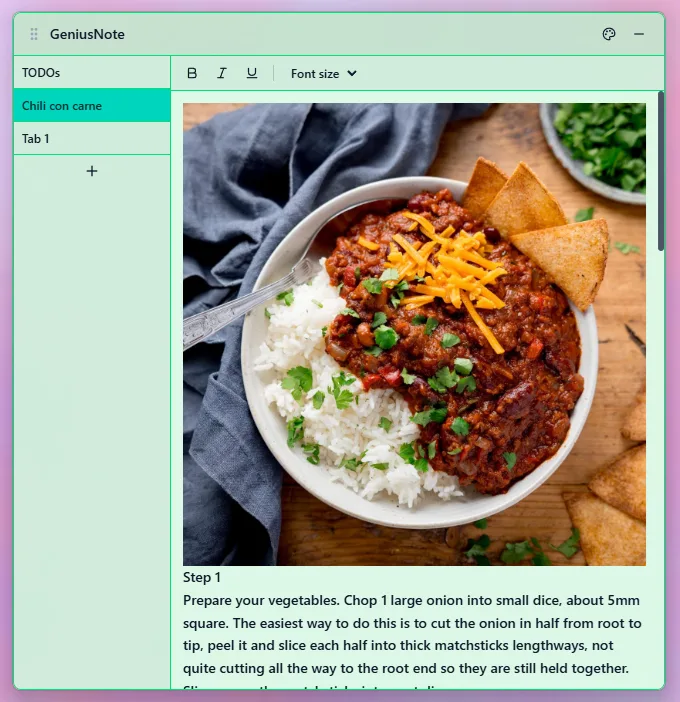
A calculator that stays on top
GeniusNotes also comes with GeniusUtility, a free calculator panel that floats above your other windows. More in always on top calculator for Windows.
Switching from Microsoft Sticky Notes
- Install GeniusNotes from the Microsoft Store. It’s free.
- Open the program of your choice, say Excel, and press Alt+N.
- Paste the text of your old note into the new one.
Which one should you pick?
Pick Microsoft Sticky Notes if you want your notes on your phone, or you want everything free with no limits.
Pick GeniusNotes if your notes belong to the programs you work in: a checklist for Excel, commands for the terminal, a script outline for Word. You’ll see each one exactly when you need it, and GeniusNote keeps everything else together in tabs.
Frequently asked questions
- Is there a better sticky notes app than Microsoft Sticky Notes?
- It depends on what you need. For notes that appear only in the app they belong to, GeniusNotes is built for exactly that. For notes on your phone, Microsoft Sticky Notes is hard to beat, and it is free.
- Can I keep Microsoft Sticky Notes on top of other windows?
- The way that works with every version is Microsoft PowerToys: turn on Always On Top, click the note and press Win+Ctrl+T. GeniusNotes has pinning built in.
- Does GeniusNotes sync with my phone?
- No. Notes stay on your PC: there is no account, no cloud and no phone app.