The best sticky notes apps for Windows 11 and 10, tested
By Adam Działo Updated
| Feature | GeniusNotes | Microsoft Sticky Notes | Notezilla | Stickies | Simple Sticky Notes | BetterStickies |
|---|---|---|---|---|---|---|
| Price | Free, premium is one-time | Free | $29.95 one-time or yearly | Free | Free | Free, $9.99 one-time |
| Free version | 5 notes, no time limit | Everything | 30-day trial | Everything | Everything | 4 notes or tabs |
| Notes tied to an app | Automatic | No | Manual | Manual | No | No |
| Always on top | Yes | Only the 2024+ version | Yes | Yes | Yes | Yes |
| Dock to screen edge | Yes | No | No | No | No | No |
| Reminders | No | No | Yes | Yes | Yes | Yes |
| Phone sync | No | Via OneNote | Paid plan | No | No | No |
| Works without an account | Yes | Sync needs one | Yes | Yes | Yes | Yes |
| Always-on-top calculator | Yes | No | No | No | No | No |
| Runs on | Windows 10, 11 | Windows 10, 11 | Windows, Mac, phones | Windows | Windows | Windows, Linux |
How I tested
I tested each app for about 30 minutes on a high-end PC while working in a typical set of programs: Word, Excel, a web browser and VS Code.
Each app got the same five jobs:
- Make a note for Excel and get it back the next time Excel is open.
- Keep a note visible on top of a maximized browser.
- Get every note out of the way for a video call, then bring them back.
- Find a note from last week.
- Leave it running for an hour and check its memory use in Task Manager.
| Feature | GeniusNotes | Microsoft Sticky Notes | Notezilla | Stickies | Simple Sticky Notes | BetterStickies |
|---|---|---|---|---|---|---|
| Clicks to tie a note to Excel | 1 shortcut (Alt+N) | Not supported | 4–5 clicks and 2 shortcuts | 3–4 clicks (Menu > Attach) | Not supported | Not supported |
| Clear the screen, then restore | 1 shortcut (Alt+Shift+H) | Manual (close each note) | Tray or shortcut (Hide all) | Tray or shortcut (Hide all) | Tray or shortcut (Hide all) | 1 shortcut (Ctrl+Alt+H) |
| Memory after an hour | ~15 MB | ~50 MB | ~25 MB | ~3 MB | ~8 MB | ~40 MB |
| Install size | ~20 MB | Built into Windows | ~32 MB | ~3 MB | ~3 MB | ~157 MB |
1. GeniusNotes: best for notes that follow your apps
Made by me- Price
- Free. Premium is a one-time purchase (US$14.99 in the US)
- Free version
- Up to 5 notes of 200 characters, no time limit
- Runs on
- Windows 10 and 11 (Mac planned)
- Download
- Microsoft Store
This is the one I built, because none of the others did the thing I wanted most: open Excel and see my Excel notes, switch to the browser and see the browser ones instead. Press Alt+N in any program and the note belongs to that program. It appears when the program is active and hides when you switch away, so the screen only ever shows notes that matter right now.
To me, GeniusNotes feels like “Sticky Notes 2.0”. It’s lightweight, reacts instantly when you switch programs and, depending on your preference, can act as part of your programs’ interface or stay out of the way. Focusing on the core did mean leaving out some of the usual extras, such as reminders or sync with other devices, at least in the current version.
Pros
- Every app gets its own note with zero setup: make it in Excel and it shows only in Excel
- Pinning and docking, plus pasted images and multiple tabs in premium
- Responds to app switches instantly, so it feels built into your programs
- Everything stays on your PC: no account, no cloud
- Premium is paid once, no subscription
Cons
- No reminders, no sync, no phone app
- The free version is limited to 5 notes of 200 characters each
- Windows only for now
Pick it if you switch between a few programs all day and want each one to keep its own notes.
2. Microsoft Sticky Notes: best for free notes that sync to your phone
- Price
- Free
- Runs on
- Windows 10 and 11, synced to OneNote on phones and the web
- Account
- Microsoft account needed for sync
- Download
- Microsoft Store
The default choice, and for plenty of people the right one. The 2024 version lives inside OneNote for Windows and can grab a screenshot together with the page it came from, then bring that note back when you visit the page again. Clicking a note made from a website or document opens that page or file and brings up the Sticky Notes side panel. What it doesn’t do is float individual notes on top of specific programs by themselves.
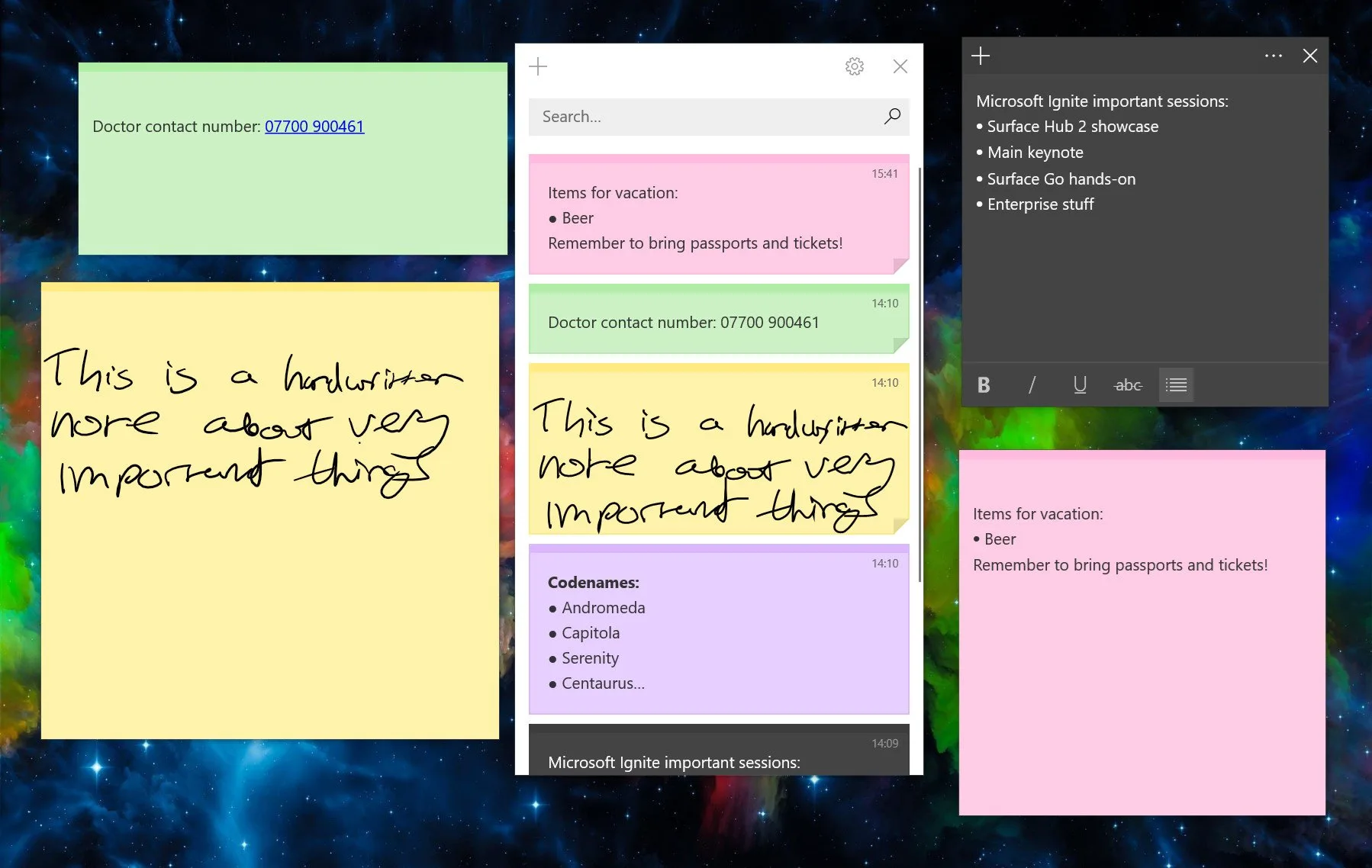
Pros
- Free, and made by Microsoft
- Notes sync to your phone through OneNote
- Takes a screenshot along with the link it came from
Cons
- The classic app has no always-on-top option
- Docking to the desktop misbehaves on multiple monitors
- All notes live in one list, not in the apps they are about
Pick it if you want a free app from Microsoft and your notes on your phone too.
3. Notezilla: best for reminders, sync and every feature there is
- Price
- US$29.95 one-time for 2 PCs, or a yearly plan with sync
- Free version
- 30-day trial
- Runs on
- Windows 11 and 10, with apps for Android, iPhone and Mac
- Download
- conceptworld.com
The veteran power tool. Notezilla can stick a note to a document, a web page, a folder or any program window, and adds reminders, checklists, memoboards and sync to your phone on top.
Tying a note to an app is a bit long-winded and unintuitive, though:
- Open Excel.
- Create a new note with Ctrl+Shift+U (or from the tray menu).
- Click the note’s menu icon (or right-click its title bar) and choose Stick to Window.
- Choose Microsoft Excel from the list of open windows and click OK.
Pros
- Attach notes to programs, documents, websites and folders
- Reminders, checklists and memoboards
- Phone apps and sync on the paid plan
Cons
- Paid after the 30-day trial
- Attaching a note to an app is a manual step
- A lot to learn if all you want is a quick note
Pick it if you want reminders, phone sync and every feature under the sun, and don't mind paying for them.
4. Stickies: best for a free classic you can configure endlessly
- Price
- Free
- Runs on
- Windows (the website lists 7, 8 and 10)
- Made by
- Zhorn Software
- Download
- zhornsoftware.co.uk
A free classic that has quietly kept going for decades. Stickies can attach a note to an application, a web page, a document or a folder, set alarms, and even send a note to someone else’s PC on your network. Despite its 2000s-era interface, it’s still rock-solid if you want desktop snapping, sending notes over your local network and deep customization, all without paying a dime.
Pros
- Free
- Attach notes to windows, websites, documents and folders
- Alarms, and sending notes to other PCs on your network
Cons
- Looks its age
- Attaching a note is done by hand, from the note menu
Pick it if you want a free app with a setting for everything and don't mind a 2000s look.
5. Simple Sticky Notes: best for plain free notes and nothing else
- Price
- Free for personal and business use
- Runs on
- Windows
- Download
- simplestickynotes.com
Simple Sticky Notes is the ultimate no-nonsense option for plain-text reminders. It focuses purely on staying lightweight, with custom themes, alarms and zero feature clutter.
Pros
- Free for home and work
- Lightweight
Cons
- No way to tie a note to an app
Pick it if you want the classic yellow notes, free, with no extras.
6. BetterStickies: best for the same notes on Windows and Linux
- Price
- Free for 4 notes, then US$9.99 one-time
- Runs on
- Windows and Linux
- Download
- betterstickies.com
Another small indie app, and its own blog ranks it first too. That’s fair: so does this one. BetterStickies stands out for visual thinkers and Linux users, offering pasted images, code highlighting and multi-page note tabs. It works offline, but caps you at 4 notes unless you unlock it.
Pros
- One-time price
- Runs on Linux too
Cons
- The free version stops at 4 notes
- No way to tie a note to an app
Pick it if you also use Linux and want one notes app on both.
What to look for in a sticky notes app
- Does it stay on top? A note hidden behind your spreadsheet is a note you forget.
- Can it tie notes to apps? If your notes are about specific programs, this saves the most time: you never have to go looking for them.
- Subscription or one-time price? Most sticky notes apps cost less than a month of a streaming service, once.
- Where do your notes live? On your PC only, or in someone’s cloud with an account.
- Do you need reminders or phone sync? If yes, that narrows the list quickly.
Not on this list
OneNote, Google Keep, Evernote and Notion are note-taking apps rather than sticky notes on your desktop, so I left them out. If what you really need is to keep a window on top, see how to keep sticky notes always on top.
Frequently asked questions
- What is the best free sticky notes app for Windows 11?
- Microsoft Sticky Notes, if you want your notes on your phone too. If you want notes that show up by themselves in the app they belong to, GeniusNotes has a free version with no time limit (up to 5 notes of 200 characters).
- Can sticky notes stay on top of other windows?
- Yes. GeniusNotes can pin a note on top of every app. For any other sticky notes app, Microsoft PowerToys can keep its window on top: click the note and press Win+Ctrl+T.
- Is there a sticky notes app that shows a note only in one program?
- Yes. GeniusNotes gives every program its own note: create it while you are in Excel and it appears only when Excel is active. Notezilla and Stickies can also attach notes to program windows from their menus.